Showing posts with label network. Show all posts

Thursday, 1 November 2018

Securing Glassfish

As written in my previous blogpost, I mentioned securing Glassfish.

Here are the steps I took. I plan to add more steps, if I find them.

change the default passwords
a no-brainer, I think
do not run glassfish as root
I already did that, but I just mention it here. If you need to have it listening to port 80, there are plenty of ways to do that without running glassfish as root.
make sure the user running glassfish has /sbin/nologin as a login shell

so nobody can get shell access, unless you use another account1.

Also means if we need to access the account ourselves, we could run:

sudo -u glassfish /bin/bash
turn off admin console access from outside the server

Go to Configuration -> server-config -> Network Config -> Network Listeners -> admin-listener.

Under the General tab, in the Address: field replace 0.0.0.0 to 127.0.0.1

Restart the server

You can access the admin console using an ssh tunnel6:

[user@localhost ~]$ ssh user@mysite.com -L 4848:localhost:4848 -N

The first 4848 is the port of your homepc. The second 4848 is the remote port. And then connecting your browser to localhost:4848.

make sure only the essentials are accessible from outside the server

an application server has a very high number of open ports, many of them are only required for local access. Verifying this can be done with the following command:

[root ~]# netstat -tulpen
Active Internet connections (only servers)
Proto Recv-Q Send-Q Local Address           Foreign Address         State       User       Inode      PID/Program name    
tcp        0      0 0.0.0.0:7676            0.0.0.0:*               LISTEN      1002       8518781    14140/java          
tcp        0      0 0.0.0.0:42853           0.0.0.0:*               LISTEN      1002       9560152    14140/java          
tcp        0      0 0.0.0.0:44425           0.0.0.0:*               LISTEN      1002       9560153    14140/java          
tcp        0      0 0.0.0.0:45613           0.0.0.0:*               LISTEN      1002       9560151    14140/java          
tcp        0      0 0.0.0.0:8686            0.0.0.0:*               LISTEN      1002       8518047    14140/java          
tcp        0      0 0.0.0.0:4848            0.0.0.0:*               LISTEN      1002       8517513    14140/java          
tcp        0      0 0.0.0.0:8080            0.0.0.0:*               LISTEN      1002       8516146    14140/java          
tcp        0      0 0.0.0.0:3700            0.0.0.0:*               LISTEN      1002       8516151    14140/java          
tcp        0      0 0.0.0.0:8181            0.0.0.0:*               LISTEN      1002       8516148    14140/java          
tcp        0      0 0.0.0.0:41593           0.0.0.0:*               LISTEN      1002       8517967    14140/javat
porttypecomments
7676Message Queue Port
42853
44425
45613
8686Pure JMX Clients Port
4848the administration consoleset it to localhost, and connect using ssh tunnel
8080the normal http listenerthis should be accessible from outside the server
3700IIOP Port ("ORB listener 1")
8181the normal https listenerthis should be accessible from outside the server
41593

This can be either done by changing the ip address in the configuration of the glassfish server to 127.0.0.1 instead of 0.0.0.0.

But it could also be done by adding firewall rules, disallowing incoming traffic to ports you do not approve.

However, why not do both?

turn off autodeployments2
asadmin set server.admin-service.das-config.autodeploy-enabled=false
dynamic-reload-enabled2 is another useful one to turn on and off in this manner
asadmin set server.admin-service.das-config.dynamic-reload-enabled=false
hide your identity
glassfish response headers contain information on what server you are running, what version, what frameworks, etc. You can turn this option off by following instructions of reference 3. Has some other excellent advice as well.
make sure any database access used by glassfish is as restricted as possible
usually it is enough to create a database user that has only access to one specific database4 5
add a second admin user account for accessing the glassfish admin console
just in case of problems
make sure the user running the glassfish has files with as restricted rights as possible
there is no reason for "other" and "group" to have any access.

References

[1] StackExchange - Unix&Linux - Does /usr/sbin/nologin as a login shell serve a security purpose?
https://unix.stackexchange.com/questions/155139/does-usr-sbin-nologin-as-a-login-shell-serve-a-security-purpose
[2] GlassFish Server Open Source Edition - Application Deployment Guide - Release 5.0
https://javaee.github.io/glassfish/doc/5.0/application-deployment-guide.pdf
[3] Securing your GlassFish. Hardening Guide
http://blog.eisele.net/2011/05/securing-your-glassfish-hardening-guide.html
[4] How to create a user in MySQL/MariaDB and grant permissions on a specific database
http://www.daniloaz.com/en/how-to-create-a-user-in-mysql-mariadb-and-grant-permissions-on-a-specific-database/
[5] MariaDB - SET PASSWORD
https://mariadb.com/kb/en/library/set-password/
[6] Frank Wiles - Quick-Tip: SSH Tunneling Made Easy
https://www.revsys.com/writings/quicktips/ssh-tunnel.html
Fine Tuning Payara Server in Production
https://blog.payara.fish/fine-tuning-payara-server-in-production
Bug 1530511 - rocksdb appears under "show databases"
https://bugzilla.redhat.com/show_bug.cgi?id=1530511

Thursday, 10 March 2016

Lightfish

Had a small issue with installing Lightfish onto my Glassfish. I noticed this issue before, but forgot to write down the solution somewhere (that's how it goes).

[2016-03-06T13:20:51.109+0000] [glassfish 4.1] [WARNING] [poolmgr.create_resource_error] [javax.enterprise.resource.resourceadapter.com.sun.enterprise.resource.allocator] [tid: _ThreadID=224 _ThreadName=AutoDep
RAR5038:Unexpected exception while creating resource for pool DerbyPool. Exception : javax.resource.spi.ResourceAllocationException: Connection could not be allocated because: java.net.ConnectException : Error connecting to server localhost on port 1527 with message Connection refused.]]

Ahhh, found the solution again, the Derby database server is not installed/started automatically:
asadmin start-database
This's what I wanted to see:
[2016-03-06T13:34:06.500+0000] [glassfish 4.1] [INFO] [NCLS-DEPLOYMENT-02035] [javax.enterprise.system.tools.deployment.autodeploy] [tid: _ThreadID=224 _ThreadName=AutoDeployer] [timeMillis: 1457271246500] [levelValue: 800] [[
[AutoDeploy] Successfully autodeployed : /home/glassfish/glassfish4/glassfish/domains/domain1/autodeploy/lightfish.war.]]

References

[0] Adam Bien - Lightfish
http://lightfish.adam-bien.com/
[1] GitHub - Lightfish
https://github.com/AdamBien/lightfish
[2] StackOverflow - Derby Pool ping fails with java.net.ConnectException in Glassfish
http://stackoverflow.com/questions/27747479/derby-pool-ping-fails-with-java-net-connectexception-in-glassfish
Youtube - Project LightFish--Java EE Telemetry For GlassFish
https://www.youtube.com/watch?v=9nU6Oubx0tQ

Tuesday, 4 March 2014

SocketProxyServer

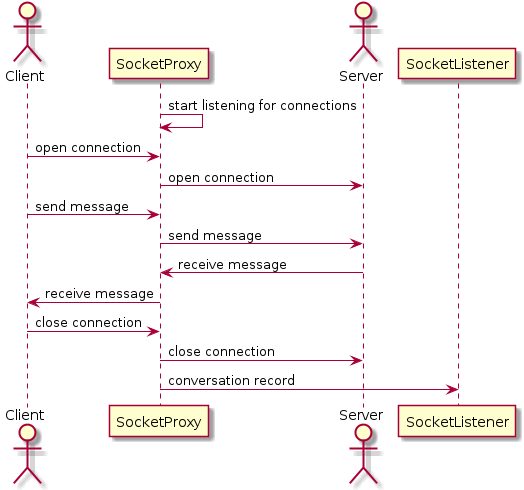
I recently had a need to check out the communication between a client and a server, as well as act upon the contents. Now, I could have used a Network Sniffer to find that out, but it's hard to have a hook with a Network Sniffer and a Java program. Besides, the level of detail is a bit too high. I was only interested in what data is actually going over the line.

With this in mind, I set about to write my "socket proxy server".

The main reason for this "socket proxy server" is because I both do not control the client and the server, yet I wish to "be involved". One saving grace is that I can change the server IP address on the client.

I tested my socket proxy server by starting it as a proxy to a simple website.

java -cp socketproxy.jar com.tools.socketproxy.Main 8080 www.karchan.org 80

So, now I could connect to http://localhost:8080 and I would see the website provided.

Here is the communication as the socket proxy server saw it. First the messages as sent by the client.
received from client:{GET / HTTP/1.1
Host: localhost:8080
User-Agent: Mozilla/5.0 (X11; Linux x86_64; rv:27.0) Gecko/20100101 Firefox/27.0
Accept: text/html,application/xhtml+xml,application/xml;q=0.9,*/*;q=0.8
Accept-Language: en-US,en;q=0.5
Accept-Encoding: gzip, deflate
Cookie: has_js=1
Connection: keep-alive
If-Modified-Since: Wed, 26 Feb 2014 16:26:34 +0000
If-None-Match: "1393431994"

}
Consequently the reply from the server.
received from server:{HTTP/1.1 200 OK
Date: Wed, 26 Feb 2014 16:29:04 GMT
Server: Apache/2.2.15 (CentOS)
X-Powered-By: PHP/5.3.3
Expires: Sun, 19 Nov 1978 05:00:00 GMT
Last-Modified: Wed, 26 Feb 2014 16:29:04 +0000
Cache-Control: no-cache, must-revalidate, post-check=0, pre-check=0
ETag: "1393432144"
Link: </node/1>; rel="canonical",</node/1>; rel="shortlink"
X-Generator: Drupal 7 (http://drupal.org)
Connection: close
Transfer-Encoding: chunked
Content-Type: text/html; charset=utf-8

26a5
<!DOCTYPE html PUBLIC "-//W3C//DTD XHTML+RDFa 1.0//EN"
  "http://www.w3.org/MarkUp/DTD/xhtml-rdfa-1.dtd">
<html xmlns="http://www.w3.org/1999/xhtml" xml:lang="en" version="XHTML+RDFa 1.0" dir="ltr"
  xmlns:content="http://purl.org/rss/1.0/modules/content/"
  xmlns:dc="http://purl.org/dc/terms/"
  xmlns:foaf="http://xmlns.com/foaf/0.1/"
...


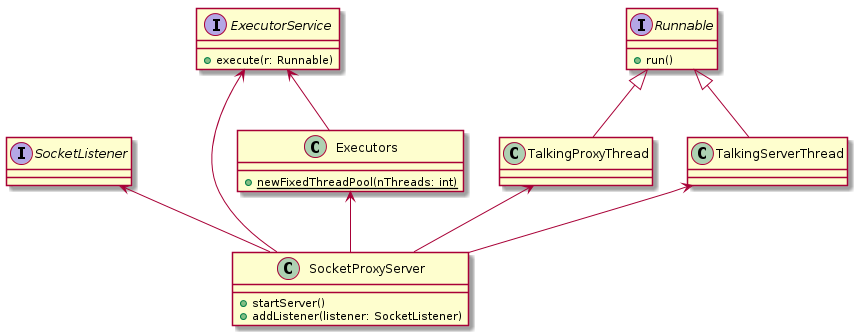
The UML diagram above, shows the main Thread classes and how they relate to each other.

Dealing with multi-threaded programming is always hard and dangerous. In our case, the threads are provided by a fixed thread pool in the concurrency package of Java. I also had a List of Messages, so the list was created using Collections.synchronizedList(List list). What helps is that two connections cannot interfere with each other, making threading easier.

You can find the source code (Java 7) and javadoc in the references below.

Currently the functionality is limited, however it should be easy to extend.

For example, the current listener will only be called after the conversation has finished. This makes the current implementation unsuitable for directly interfering in the communication.

I required this socket proxy server for one of my private hobby projects. This will be the subject of one of my next blog posts. See [1].

References

Github - socketproxy repository
https://github.com/maartenl/socketproxy
Github - socketproxy javadoc
http://maartenl.github.io/socketproxy/javadoc/
[1] Google App Engine - First Try
http://randomthoughtsonjavaprogramming.blogspot.nl/2014/03/google-app-engine-first-try.html

Tuesday, 20 August 2013

My Current Network

I just thought I'd create a diagram of what devices I have where in my network, with what names. It's beginning to get a little difficult to keep them apart.
Made a small batch script to check my network ips, just for fun.
#!/bin/bash
for i in {1..150}
do
   ping -c 3 -w 100 10.0.0.$i | grep -e "icmp_req" -e "PING"
done
As you are no doubt aware, I've based the names of my devices, the naming scheme, on characters in Sir Arthur Conan Doyle's Sherlock Holmes.

Tuesday, 13 November 2012

The network was the computer?


What happened to http://thenetworkisthecomputer.com/[1]? It used to point to a Tribute website regarding Sun, but now it just points to Oracle.

I guess all things pass.

P.S. Startling how back then (1984[3]!!) "The network is the computer" could nowadays be translated as "All your stuff's in the Cloud" (2006[4], 22 years later). I guess they were ahead of their time.

References

[1] a Tribute to Sun Microsystems
http://www.thenetworkisthecomputer.com/
[2] Screenshot : a Tribute to Sun Microsystems
http://dawhois.com/site/thenetworkisthecomputer.com.html
[3] Celebrate 25 years of SPARC Innovation
http://www.oracle-downloads.com/sparc25info/
[4] The Google Podium transcript
http://www.google.com/press/podium/ses2006.html